By
Michael Bird
•
1
min read


Portal users can now add limited time offers directly to their Apartments.com.au listings, and it's a straightforward way to convert more of the buyers already looking at your project.
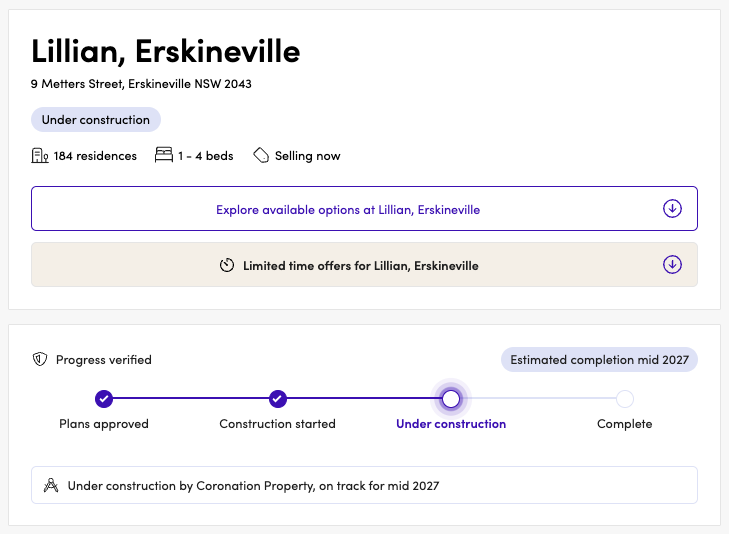
Offers appear in two places on a listing page: a dedicated offers section further down the page, and a summary indicator in the overview section at the top.
Log into Apartments.com.au Portal >
Buyers researching new apartments are usually comparing several projects at once, often with similar price points, locations and specs. An offer gives them a reason to act on your listing rather than keep shopping around. A stamp duty saving, a limited time price reduction or a move-in incentive creates urgency that pushes an interested buyer from browsing to enquiring, which is the exact behaviour this feature is designed to drive.
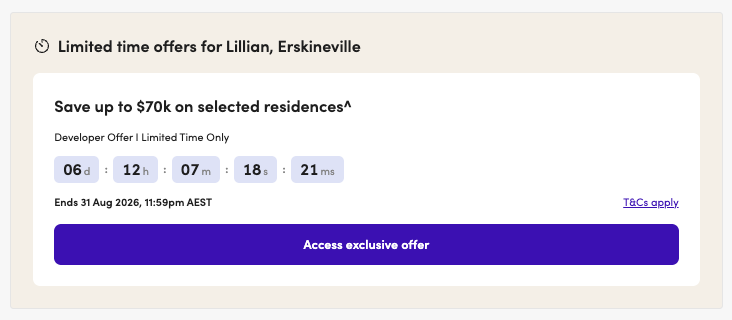
Adding an offer takes less than one minute through the portal. Set your start and end dates and it will display and expire automatically, with no ongoing manual work required.
If your project has a current incentive, add it to your listing now.
Log into Apartments.com.au Portal >
.jpeg)
Speak to the team about leveraging the Apartments.com.au audiences and services for your new development.

Greg Billings
Director of Residential Projects

Sonia Fava
Director

Nick Clydsdale
Senior Director

Heath Thompson
Director

Todd Matheson
Director

Thomas Panson
Project Sales & Marketing Agent

Scott Jessop
Head of Sales & Marketing

Alex Adams
Head of Sales & Marketing and
Head of New Business


.png)
.png)

.png)
.png)
.png)



.png)




.png)
.png)

.jpg)
.png)
.png)


.jpg)
.jpg)
.jpg)
.jpg)

.jpg)

.jpg)

.jpg)


.png)
.png)


.jpg)


.jpg)

.jpg)


